
Switching between TV apps and the HDMI input on an HDfury Arcana
Your Arcana feed works, and the TV's own apps work, but switching between them loses the sound one way or the other. HDfury expect this to be one of the main issues people hit, and there is one rule that decides whether it works at all.
Does this match your symptoms?
- Sound disappears when you switch between the television's apps and the HDMI input.
- One of the two works and the other stays silent.
- It only goes wrong when you switch with a remote other than the television's.
Fix it in this order
- Use only the television's own remote to switch. It is the CEC burst from that remote that tells the HDfury Arcana to change the audio route.
- Check the OLED. Selecting apps should show ARC (From TV); selecting the HDfury Arcana's HDMI input should show eARC HDMI INPUT.
- Prove the HDMI link first. Confirm source to Arcana to display plays correctly before working on CEC or ARC at all.
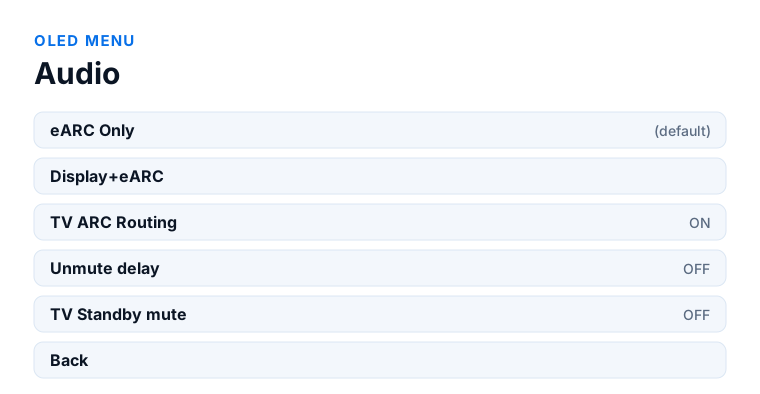
- Try OLED menu → Audio → Display+eARC. On some televisions eARC Only has to be changed before ARC and HDMI selection works.
- Or turn TV ARC Routing off in the same menu. You lose the television's own audio, but external sources become reliable.
Which model do you have?
HDfury Arcana (18Gbps). The Audio sub-menu, TV ARC Routing and the OLED read-out are identical on both models. Your television connects to the single HDMI output, which is CEC, ARC and eARC capable.
HDfury Arcana 2 VRR (40Gbps). Same menu and the same behaviour, with one wiring requirement: the television must be on the primary output TX0. HDMI COPY is not ARC or eARC capable, so a television connected there will never return its audio and the OLED will never switch to ARC (From TV).
Use the TV remote. Not the source remote.
This is stated in the manual as mandatory, and it is the single most common reason this fails. Always use the display's own remote — or the display's remote codes on a universal remote — to switch between the TV's apps and the HDMI input where the HDfury Arcana sits.
The reason is mechanical. Every time you press an app or input button on the TV remote, a burst of CEC commands goes out across the chain. The Arcana listens for those commands, and they are what tells it to switch the audio between the ARC return from the TV and its own HDMI input. Switch using anything else and those commands are never sent, so the Arcana has no way to know the context changed.
If you do not use CEC and you are not retrieving ARC sound from the TV, none of this applies to you. It only matters when the TV's own audio has to come back through the Arcana.
The test that tells you whether it works
The OLED gives you a direct read-out, and it takes ten seconds to check.
Select apps on the TV with the TV remote. The HDfury Arcana's main OLED page should switch to ARC (From TV).
Now select the HDMI input where the Arcana is connected. The OLED should report eARC HDMI INPUT.
If both of those happen, the routing is working and any remaining problem is elsewhere. If they do not, then ARC and CEC are not behaving as they should in your chain, and the manual's advice is to try a newer firmware when one appears and report the behaviour to HDfury's Discord support server.
Also check the TV's other inputs while you are there, to make sure audio flows through TV ARC into the Arcana and on to the sound system.
What is actually happening underneath
When a TV sees a device on an input, it asks what that device is. The HDfury Arcana answers that it is an audio system. At that point the TV starts ARC, mutes its own speakers, and begins passing volume commands from its remote as CEC messages.
From then on, audio from the TV's apps and audio routed to the TV through its HDMI inputs both flow back over ARC. That is the arrangement you are switching between, and it only holds together while the CEC conversation stays intact.
It is worth being realistic about CEC here. The manual describes it as a 25-year-old mechanism inherited from the SCART era, with no real standard, implemented differently by every manufacturer. HDfury say plainly that the ARC and CEC features were added on request and are not flawless across all display brands and models.
If it still will not switch
There are two settings in the Audio sub-menu worth trying, and they pull in opposite directions.
TV ARC Routing is on by default and can be turned off. Doing so stops the HDfury Arcana retrieving ARC sound from the display, which is the right move if ARC retrieval itself is what is misbehaving. You lose the TV's own audio through the sound system, but you get a stable chain for external sources.
eARC Only has been the default since firmware 0.71. On some displays it needs to be changed to Display+eARC for the ARC and HDMI selection to work at all. That is worth trying before concluding the display is at fault.
The manual's ordered recovery list for CEC and ARC problems: turn the TV off, wait a few minutes, turn it on; unplug the TV power cord, wait, replug; turn the TV's CEC off and back on, adding sources one at a time if there are several; unplug and replug the HDMI cable to the sound system; power the Arcana and the source off and on; and finally, a Factory Default from the FW/RESET sub-menu.
Do the cables first
HDfury are explicit about the diagnostic order, and it is the opposite of what most people do. The first step is not volume control, CEC or ARC. The first step is confirming that source to HDfury Arcana to display plays content correctly, so that you know the HDMI link itself is solid.
Only once that is established does it make sense to work on CEC, ARC and volume control. A marginal cable produces symptoms that look exactly like a CEC fault, and you can lose an evening to settings that were never the problem.
Frequently asked
What should I do if I have an HDfury Arcana (18Gbps)?
The Audio sub-menu, TV ARC Routing and the OLED read-out are identical on both models. Your television connects to the single HDMI output, which is CEC, ARC and eARC capable.
What should I do if I have an HDfury Arcana 2 VRR (40Gbps)?
Same menu and the same behaviour, with one wiring requirement: the television must be on the primary output TX0. HDMI COPY is not ARC or eARC capable, so a television connected there will never return its audio and the OLED will never switch to ARC (From TV).
Why must I use the TV remote to switch inputs?
Pressing an app or input button on the TV remote sends CEC commands across the chain, and the HDfury Arcana uses those to switch the audio between the TV's ARC return and its own HDMI input. Another remote does not generate them.
How do I check whether ARC switching works?
Select apps on the TV and the OLED should show ARC (From TV). Select the HDMI input where the HDfury Arcana sits and it should show eARC HDMI INPUT. If both happen, routing is working.
Can I turn off ARC retrieval from the TV?
Yes. TV ARC Routing in the Audio sub-menu is on by default and can be switched off. You lose the television's own audio through the sound system but gain a more stable chain for external sources.
Should I fix CEC before or after checking cables?
After. The manual is explicit that the first step is confirming source to HDfury Arcana to display plays correctly, so the HDMI link is known solid, before touching CEC, ARC or volume control.
Related
- CEC volume control not working
- TV remote volume on a Sonos Arc
- eARC not working or falling back to ARC
Does an HDfury Arcana or HDfury Arcana 2 solve this?
Both models behave the same here. TV ARC Routing and the eARC Only default have been present since firmware 0.71.
Checked against the official HDfury Arcana and HDfury Arcana 2 manuals and against firmware 0.88 and 0.25, August 2026.