
eARC not working or falling back to ARC on an HDfury Arcana
Either there is no sound at all, or the sound is there but the lossless formats are gone. Those are two different faults with two different causes.
Does this match your symptoms?
- No sound at all from the sound system, on any source.
- There is sound, but the lossless formats are gone and it reports Dolby Digital.
- The connection works at first and then quietly drops back to ARC.
Fix it in this order
- Check the physical port. The HDfury Arcana's eARC output must go to the port on the soundbar or receiver marked ARC or eARC, not a regular HDMI input.
- Put the sound system on the right input and confirm it is not muted or on a different source.
- Enable CEC on the sound system. Many devices tie the audio return path to the CEC setting, so switching CEC off takes eARC with it.
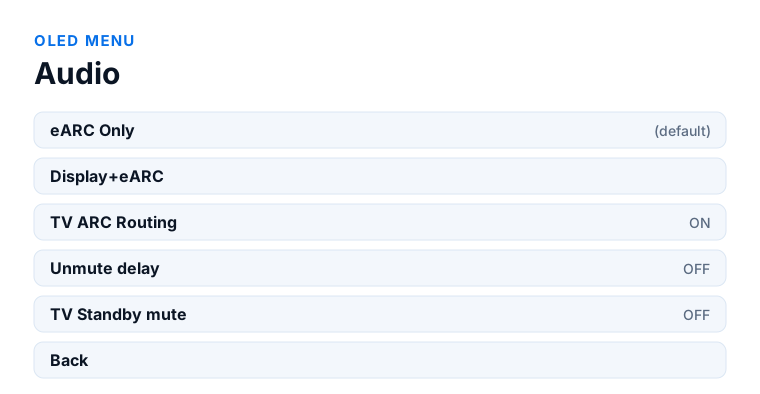
- Check the firmware version on the OLED against the current release on the downloads page.
- Power everything fully off, then start the sound system, the HDfury Arcana, the display and the source last.
Which model do you have?
HDfury Arcana (18Gbps). One HDMI output and one eARC output. The HDMI T0 output is CEC, ARC and eARC capable, so that is the one that goes to a television whose ARC audio you want to retrieve.
HDfury Arcana 2 VRR (40Gbps). Two HDMI outputs plus eARC, and only the primary output TX0 is CEC, ARC and eARC capable. If you are retrieving ARC audio from the television, it must be connected to TX0 and not to HDMI COPY — connecting it the wrong way round is a common cause of eARC that never engages.
ARC and eARC are not the same connection
ARC has been in HDMI since 1.4 and carries a compressed audio return path: Dolby Digital, DTS, and stereo PCM. eARC arrived with HDMI 2.1 and carries far more bandwidth — enough for Dolby TrueHD, DTS-HD Master Audio and multichannel PCM. They share the same connector, which is exactly why the failure mode is confusing: a chain that quietly falls back to ARC still produces sound. It just produces the wrong sound.
So there are really two questions here: is there any audio at all, and is it running at eARC quality?
No audio at all
1. The right physical port
The HDfury Arcana's eARC output goes to the port on the audio system that is marked eARC or ARC. On an AV receiver that is usually a single specific HDMI port, often labelled “HDMI OUT (eARC)”. On a soundbar there is generally only one HDMI input and it is the right one. Getting this wrong produces exactly the symptom of a dead connection.
2. The audio system must be on the right input
Soundbars and receivers do not always switch to the HDMI/TV input automatically when a signal appears. Select it by hand once and see whether the situation changes.
3. CEC
ARC leans on HDMI-CEC for control signalling, and manufacturers all brand it differently: Anynet+ on Samsung, Simplink on LG, Bravia Sync on Sony, Viera Link on Panasonic. If CEC is off on the audio system, ARC often will not come up. eARC is less dependent on it, but plenty of devices still gate the whole audio return path behind the CEC setting.
4. Firmware
Check the version on the OLED display against the downloads page. Do not downgrade an HDfury Arcana that shipped with 0.87 or newer unless HDfury support tells you to.
There is audio, but it is not eARC quality
The tell is the format readout on your soundbar or receiver: you see Dolby Digital or DTS where you expect TrueHD or DTS-HD MA. That is a fallback to ARC, and it has a small number of causes.
The source is not sending the lossless format
The most common cause by far, and it has nothing to do with eARC. A disc player set to PCM output decodes internally and never sends TrueHD at all. Set the player's HDMI audio output to bitstream or auto.
The cable
eARC needs the HDMI Ethernet channel, which the cheapest cables sometimes skip entirely even though video works fine. Use a cable rated High Speed with Ethernet at minimum, and Ultra High Speed if 4K120 video shares the same run. Cable faults on long runs are far more common than they should be — if you have a two-metre cable in a drawer, testing with it takes two minutes and eliminates a whole category of cause.
EDID
If the HDfury Arcana is advertising an EDID that does not include the lossless audio formats, the source will not send them. On the automatic profile the Arcana merges what it reads from the display and the audio system, and a conservative display can drag the merged result down. Forcing a profile based on the audio system solves it. The Arcana 2 manual documents the profiles.
Handshake order
Power everything off. Start the audio system, then the HDfury Arcana, then the display, then the source. HDMI negotiates once and does not renegotiate on its own.
A note on projectors
Projectors almost never have an audio return path at all. That is not a fault to be diagnosed — it is the reason the HDfury Arcana exists. The audio comes out of the Arcana's eARC port and never touches the projector.
Frequently asked
What should I do if I have an HDfury Arcana (18Gbps)?
One HDMI output and one eARC output. The HDMI T0 output is CEC, ARC and eARC capable, so that is the one that goes to a television whose ARC audio you want to retrieve.
What should I do if I have an HDfury Arcana 2 VRR (40Gbps)?
Two HDMI outputs plus eARC, and only the primary output TX0 is CEC, ARC and eARC capable. If you are retrieving ARC audio from the television, it must be connected to TX0 and not to HDMI COPY — connecting it the wrong way round is a common cause of eARC that never engages.
Can I use eARC with a TV that only has ARC?
Not through the TV, no. But that is exactly the case the HDfury Arcana handles: it takes the audio from the source before the TV sees it and sends it to the audio system over its own eARC output, so the TV's limitation stops mattering.
Do I need a special HDMI cable for eARC?
eARC uses the HDMI Ethernet channel, so the cable must actually implement it. High Speed with Ethernet is the minimum. If the same cable also carries 4K120 video, use an Ultra High Speed cable rated for 48 Gbps.
Why does my receiver show Dolby Digital instead of TrueHD?
Either the source is set to PCM output instead of bitstream, or the chain has fallen back to ARC. Check the source setting first - it is the more common of the two.
Does the HDfury Arcana need CEC enabled?
Not for its own operation, but the audio system on the other end of the eARC link often does, because many devices tie the audio return path to the CEC setting.
Related
Does an HDfury Arcana or HDfury Arcana 2 solve this?
The original Arcana handles this at up to 4K60. Arcana 2 is only needed for 4K120, VRR or 8K video.
Checked against the official HDfury Arcana and HDfury Arcana 2 manuals and against firmware 0.88 and 0.25, August 2026.