
Audio runs ahead of the picture on an HDfury Arcana
You hear the line before you see the lips move. That is the expected side effect of pulling audio out before the display, and there is a control for it.
Does this match your symptoms?
- You hear the line before you see the lips move.
- The offset is constant rather than drifting, and it is the same on every source.
- It started the moment you put an HDfury Arcana in the chain.
Fix it in this order
- Confirm the audio is early, not late. With an HDMI source at the HDfury Arcana input, early is the only situation that can occur unless you set a delay yourself.
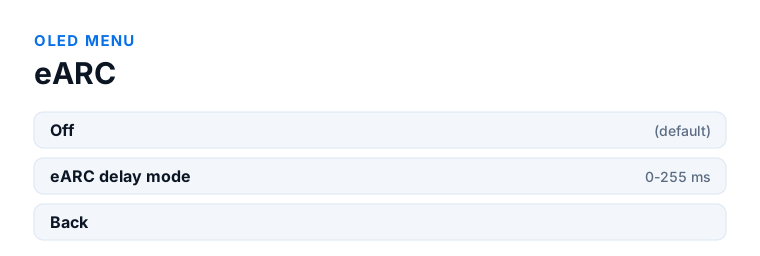
- OLED menu → eARC → eARC delay mode. It is off by default. Start at 0.
- Raise the value in steps of about 20 ms, not 5, and judge on dialogue with a clear view of the speaker's mouth.
- If nothing changes at any value, your sound system is ignoring the eARC delay message. Use the delay control in its own app — on a Sonos Arc, the Sonos app.
- Apple TV owners: enable Wireless Audio Sync. It handles the remainder accurately once an HDfury Arcana is in the chain.
Which model do you have?
HDfury Arcana (18Gbps). OLED menu → eARC → eARC delay mode, adjustable from 0 to 255 ms. Off by default. This is the only audio path you have, so this is the only delay to set.
HDfury Arcana 2 VRR (40Gbps). Same eARC sub-menu and the same 0 to 255 ms range. If you are feeding an older AVR through HDMI COPY in Audio Only TX1 mode, note that this is a separate audio path with its own timing — the eARC delay does not apply to it, and the receiver's own lip-sync setting is the control there.
Why this happens, and why it is a good sign
In an ordinary setup the audio travels through the TV and comes back out of the ARC port, so it picks up the TV's picture processing delay along the way — and by accident, that keeps it roughly in step with the image.
An HDfury Arcana deliberately breaks that. It takes audio out of the chain before the display, which is the entire point: the TV never gets the chance to downgrade the format. But it also means the audio no longer waits for the TV's video processing. On a display with heavy processing that can be tens of milliseconds, and the result is sound that arrives ahead of the picture.
So this symptom is the expected consequence of doing the right thing, and the Arcana has a control specifically for it.
The fix: adjustable eARC delay
Both models can delay the audio going out of the eARC port, adjustable from 0 to 255 milliseconds. Enable the eARC delay in the OLED menu and raise it until picture and sound line up. It is off by default, and returns to off after a factory reset or a firmware update.
The mechanism is worth knowing, because it explains the one case where the setting appears to do nothing. The manual describes the delay as protocol-based information that the HDfury Arcana issues to the sink: the value is sent over the eARC link and the sound system applies it. A sound system that ignores that message will not respond to the setting, however far you turn it. In that case use the delay control in the sound system's own app instead — on a Sonos Arc, that is the Sonos app.
A practical way to land on the right number: start at 0, then work in steps of about 20 ms rather than 5. Small steps are hard to judge, and the ear is much better at spotting the point where you have gone too far than at spotting gradual improvement. Once sound clearly lags, come back down a step or two. Use dialogue with a clear view of the speaker's mouth — a news broadcast or a talk show is more reliable than an action scene.
Audio can only ever be early, not late
This is worth stating as firmly as the manual does, because it saves people from looking in the wrong place. With an HDMI source at the HDfury Arcana's input, the only situation that can occur is that audio runs ahead of the picture. Audio cannot be late — assuming you have not forced a delay yourself, either in the Arcana or in the sound system's app.
So if your sound genuinely lags the picture, check for a delay you set earlier and forgot about before assuming something is broken. Apple TV owners get this handled for them: the Wireless Audio Sync feature deals with the remaining audio-before-video offset accurately, and the manual notes it did not work properly before an Arcana was in the chain, because it could not delay video and got confused.
The one thing it cannot do
The delay only works in one direction. It can hold audio back to wait for the picture; it cannot move audio that is already late any earlier. Nothing in the chain can — you cannot send sound before it exists.
If your audio is behind the picture, something else is adding delay to it, and the cause is elsewhere:
- The soundbar or AV receiver has its own lip-sync or delay setting, often left at a non-zero value.
- Wireless surrounds or a wireless subwoofer add latency of their own.
- The TV is applying its own AV-sync correction on top, which now over-corrects because the audio no longer goes through it. Setting the TV's audio delay back to zero is worth trying.
- Some streaming apps have per-app sync offsets.
Reduce the delay instead of compensating for it
Compensation always works, but less delay to compensate for is better. Turning on the display's Game mode, or switching off motion interpolation and noise reduction, cuts the picture processing delay substantially — often enough that the required audio delay drops to a value you no longer notice while switching sources.
What about video delay through the HDfury Arcana itself?
According to the manuals both models add only a few pixel clocks of processing to the video path. That is far below anything perceptible and is unrelated to the adjustable audio delay. If you see a sync problem, it is not the Arcana delaying your picture.
Frequently asked
What should I do if I have an HDfury Arcana (18Gbps)?
OLED menu → eARC → eARC delay mode, adjustable from 0 to 255 ms. Off by default. This is the only audio path you have, so this is the only delay to set.
What should I do if I have an HDfury Arcana 2 VRR (40Gbps)?
Same eARC sub-menu and the same 0 to 255 ms range. If you are feeding an older AVR through HDMI COPY in Audio Only TX1 mode, note that this is a separate audio path with its own timing — the eARC delay does not apply to it, and the receiver's own lip-sync setting is the control there.
How many milliseconds should I set?
There is no universal number - it depends on your display's processing. Start at 0, raise in steps of about 20 ms until sound clearly lags, then come back down. Most setups land somewhere between 40 and 120 ms.
My audio is behind the picture instead of ahead. Now what?
The eARC delay cannot help with that, because it only delays audio further. Look for the cause elsewhere: the soundbar's own delay setting, wireless surrounds, or the TV's AV-sync correction still being active.
Do I need a different delay per source?
Sometimes. The delay compensates for the display's processing, so it is largely constant per display - but game consoles in Game mode and film sources in a processed picture mode can differ enough to notice.
Does the HDfury Arcana delay the video too?
No. Both models add only a few pixel clocks to the video path, which is not perceptible. The adjustable delay applies only to the eARC audio output.
Related
- eARC not working or falling back to ARC
- HDfury Arcana online manual — OLED menu and eARC delay
- PlayStation 5 setup
Does an HDfury Arcana or HDfury Arcana 2 solve this?
Both models have this delay. The original Arcana is enough unless you also need 4K120 or VRR.
Checked against the official HDfury Arcana and HDfury Arcana 2 manuals and against firmware 0.88 and 0.25, August 2026.