
Brief audio dropouts every few minutes on an HDfury Arcana
Not a failure, just a gap: roughly a second of silence, every three to ten minutes, almost always on Dolby Atmos or TrueHD content. Long enough to notice, short enough that by the time you look up it is back.
Does this match your symptoms?
- Roughly a second of silence, returning every three to ten minutes.
- It happens on Dolby Atmos or TrueHD but rarely on compressed formats.
- It happens from a PS5 or a UHD Blu-ray player, and the picture never drops.
Fix it in this order
- Substitute cables you know are good, 2 to 4 metres of copper. A cable can pass a test once and still fail intermittently.
- Check the link to the sound system separately. Atmos over ARC needs a cable rated for 192 kHz ARC, which is a different requirement from video bandwidth.
- Play the same content in a compressed format. If the dropouts stop, the fault is specific to the high-bandwidth stream.
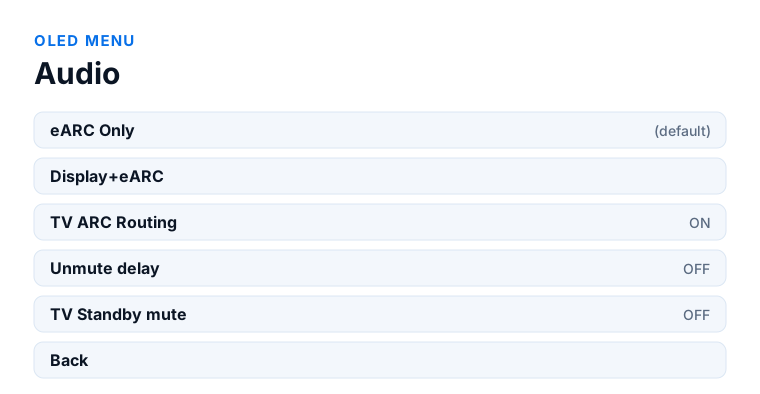
- OLED menu → Audio → Unmute delay ON if the dropouts cluster around format or scene changes rather than occurring at random.
- Update firmware on all three devices — the HDfury Arcana, the television and the sound system. Dropout behaviour has changed across releases on all of them.
Which model do you have?
HDfury Arcana (18Gbps). Cables, format and firmware are the whole toolkit here, and OLED menu → Audio → Unmute delay is the one setting worth trying. With a single HDMI output there is no way to route around the eARC link.
HDfury Arcana 2 VRR (40Gbps). Same checks, plus one option the original model does not have. If the dropouts survive everything and you own an AVR, OLED menu → Scaler → Audio Only TX1 sends full audio to that receiver over HDMI COPY as a 1080p stream, bypassing the eARC link entirely. That is a useful diagnostic even if you do not want to keep it: if the dropouts vanish, the fault was in the eARC path.
The pattern owners describe
The reports are consistent enough to be recognisable. It happens on high-bandwidth audio — Atmos over TrueHD, DTS-HD Master Audio — and rarely or never on compressed formats. It happens from PS5 and from UHD Blu-ray players such as the Panasonic UB820. It happens at intervals of minutes rather than seconds, which is what makes it so hard to pin down.
It is also worth saying clearly that this pattern is reported on chains without an HDfury Arcana too, straight from a source to an eARC television and on to a soundbar. That matters for diagnosis: the dropout is not evidence that the Arcana is at fault, and owners have added an Arcana specifically to get around it.
Rule out the cable, properly
This is first for a reason, even though owners often report the fault surviving a cable change. The manual is direct about it: if anything at all is behaving strangely in video or audio, establish that the cables are known good at full speed before anything else.
And it makes a point that applies exactly here: a cable can pass 4K60 with Atmos, show full bandwidth on the OLED, and even pass the Apple TV Dolby Vision test, while still producing intermittent errors. Passing once is not the same as being reliable, and intermittent is precisely how a marginal cable fails.
Two specifics worth checking. Copper cables should be between 2 and 4 metres; owners have traced dropouts and distortion to a cable of about 30 centimetres between the HDfury Arcana and the display. And the link to the soundbar has its own requirement — Atmos over ARC needs a cable that supports 192 kHz ARC, and a cable that handles 600 MHz of video can still fail on that audio signal.
Isolate which link drops
Split the chain. Connect the source straight to the sound system if that is possible in your setup, or straight to the television, and see whether the dropouts follow.
Then change one variable at a time. Play the same content with the source set to a compressed format instead of bitstream Atmos — if the dropouts stop, the fault is specific to the high-bandwidth stream and not to the connection in general. Try a different source playing similar content. Try the same source into a different input.
Watch the OLED while it happens if you can. A momentary change in what the HDfury Arcana reports at the instant of the dropout tells you the signal itself is being interrupted; a dropout with no change on the OLED points downstream, at the sound system's decoding.
Settings that are worth trying
Unmute delay is off by default and adds extra delay around audio format changes and source or signal switching. It is documented as the remedy for noise when switching content, and it is worth turning on if your dropouts cluster around scene or format changes rather than occurring at random.
eARC Only keeps audio away from the television entirely. If you are currently on Display+eARC, the television is receiving the Atmos stream as well, and some televisions cope badly with it — the same underlying reason others display an unsupported format banner.
Firmware on all three devices. Dropout behaviour has changed across releases on soundbars and televisions as much as on the HDfury Arcana, and a chain that has been stable can start dropping after an update elsewhere.
When it is the sound system
Soundbars have their own history here. Sonos have publicly acknowledged an Atmos-related issue on the Arc, and comparable dropout reports exist across other manufacturers' eARC soundbars with no HDfury device anywhere in the chain.
That is not a reason to stop investigating, but it does change where to look. If you have ruled out cables and the dropouts persist regardless of source, the remaining candidates are the eARC implementation in your sound system and its firmware — and those are outside what any device upstream can influence.
Frequently asked
What should I do if I have an HDfury Arcana (18Gbps)?
Cables, format and firmware are the whole toolkit here, and OLED menu → Audio → Unmute delay is the one setting worth trying. With a single HDMI output there is no way to route around the eARC link.
What should I do if I have an HDfury Arcana 2 VRR (40Gbps)?
Same checks, plus one option the original model does not have. If the dropouts survive everything and you own an AVR, OLED menu → Scaler → Audio Only TX1 sends full audio to that receiver over HDMI COPY as a 1080p stream, bypassing the eARC link entirely. That is a useful diagnostic even if you do not want to keep it: if the dropouts vanish, the fault was in the eARC path.
How long are the dropouts?
Owners describe roughly a second, at intervals of three to ten minutes, almost always on Atmos or TrueHD content and rarely on compressed formats.
Does the HDfury Arcana cause this?
Not necessarily. The same pattern is reported on chains without an Arcana, straight from source to eARC television to soundbar. Many owners added an Arcana to work around it.
I already replaced the cables. Should I look elsewhere?
Check the specifics rather than the fact of replacement: copper between 2 and 4 metres, and a cable rated for 192 kHz ARC on the link to the soundbar, which is a separate requirement from video bandwidth.
Which setting is worth trying first?
Unmute delay, if the dropouts cluster around format or scene changes. It adds delay around audio format switching and is documented as the remedy for noise when content changes.
Related
- Which HDMI cable do you need?
- No Dolby Atmos on Sonos Arc or Beam Gen 2
- Audio echo, or an unsupported format banner
Does an HDfury Arcana or HDfury Arcana 2 solve this?
Reported on both models and on chains with no HDfury device at all. Cables first, then format, then firmware.
Checked against the official HDfury Arcana and HDfury Arcana 2 manuals and against firmware 0.88 and 0.25, August 2026.