
Audio echo or an unsupported format banner with an HDfury Arcana
Two different-looking complaints with one shared cause: audio is being sent to the television when it should not be. Both are fixed by the same setting, and both are easy to miss for the same reason.
Does this match your symptoms?
- The sound seems doubled, smeared or oddly wide, as if two speakers are slightly out of step.
- Your television repeatedly shows a message about an unsupported audio format and will not stop.
- The television's own speakers are still playing while the soundbar plays the same thing.
Fix it in this order
- Check the television's sound output setting. If it is still playing through its own speakers, that is your echo.
- On the HDfury Arcana, open the OLED menu → Audio and select eARC Only. Sound then goes to the eARC system and not to the display. This is the default since firmware 0.71.
- Power-cycle the source and confirm the television's speakers are now silent.
- For the unsupported format banner, the same setting is the fix — eARC Only stops Atmos reaching the television at all.
- If ARC switching breaks as a result, go back to Display+eARC and mute the television's speakers by hand instead.
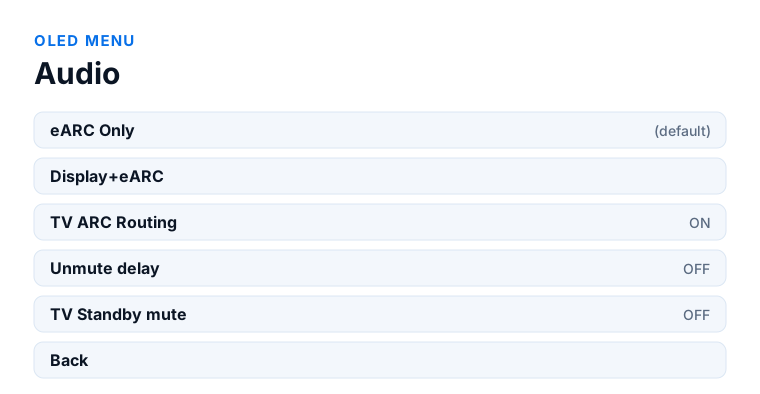
Which model do you have?
HDfury Arcana (18Gbps). The Audio sub-menu is identical on both models. Open the OLED menu → Audio and select eARC Only. There is one HDMI output, so if you need the television to receive audio you have no alternative route and will have to mute its speakers by hand.
HDfury Arcana 2 VRR (40Gbps). Same Audio sub-menu, same eARC Only setting. But you have a second output: if the television needs audio for ARC switching to work, you can feed it through HDMI COPY instead of switching to Display+eARC, which keeps Atmos away from the television's main input and avoids the format banner.
The echo you do not notice you are hearing
If the sound seems slightly doubled, smeared, or oddly wide, the likely explanation is that the television's built-in speakers are playing the same audio as your soundbar, very slightly out of step.
This is genuinely hard to spot, and the manual says why: the soundbar usually sits directly in front of or below the television, so both sources come from the same direction. You hear something wrong without being able to point at it.
Checking is quick. Look at the television's sound output setting. If it is playing through its own speakers rather than the external system, that is your echo.
The fix is to stop sending audio to the television at all. In the Audio sub-menu, select eARC Only, which sends sound to the eARC system and not to the display. This has been the default mode since firmware 0.71, so if you are on current firmware and seeing this, something has been changed — or a firmware update reset a change you made deliberately.
The unsupported audio format banner
Some televisions display a message about an unsupported audio format, over and over, and will not stop. It is the same underlying situation from a different angle.
The manual is specific about the cause: some televisions do not cope with an Atmos signal arriving at their input, most likely because of the Atmos MAT metadata carried with it. The television has no way to express this other than throwing a banner.
Same fix. Select eARC Only under Audio so that no Atmos is sent to the television. The audio still reaches your sound system in full; the television simply stops receiving something it cannot make sense of.
If you need the television to receive audio for some other reason, Display+eARC sends it to both — but that is precisely the configuration that produces this banner, so those two requirements pull against each other.
When you do want Display+eARC
eARC Only is not always the right answer, and it is worth knowing when to move away from it.
The manual notes that Display+eARC can help with ARC retrieval problems on some displays, and that on certain televisions eARC Only has to be changed to Display+eARC before the ARC and HDMI input selection works at all.
So there is a genuine trade-off. eARC Only avoids echo and format banners. Display+eARC can be necessary to make ARC switching work on a difficult television. If your chain needs the second, you may end up muting the television's speakers manually instead of relying on the routing to do it.
The related setting that catches people
TV Standby mute is off by default. That means the HDfury Arcana keeps sending sound to the eARC system when the television is turned off, which is intentional — it lets you listen without the screen on.
If you would rather the sound stopped with the television, turn TV Standby mute on. It is a common source of confusion in the other direction too: people report that their soundbar keeps playing after the TV is off and assume something is broken, when the device is doing exactly what it was designed to do.
One more from the same menu: Unmute delay, off by default, adds extra delay around audio format changes and source or signal switching. If you hear a burst of noise when switching channels, content or sources, turning it on is the documented remedy.
Frequently asked
What should I do if I have an HDfury Arcana (18Gbps)?
The Audio sub-menu is identical on both models. Open the OLED menu → Audio and select eARC Only. There is one HDMI output, so if you need the television to receive audio you have no alternative route and will have to mute its speakers by hand.
What should I do if I have an HDfury Arcana 2 VRR (40Gbps)?
Same Audio sub-menu, same eARC Only setting. But you have a second output: if the television needs audio for ARC switching to work, you can feed it through HDMI COPY instead of switching to Display+eARC, which keeps Atmos away from the television's main input and avoids the format banner.
Why does my sound seem doubled?
The television's own speakers are probably playing alongside the soundbar, slightly out of step. It is hard to notice because the soundbar sits directly below the screen. Check the TV's sound output setting.
How do I stop audio going to the television?
Select eARC Only in the Audio sub-menu. It sends sound to the eARC system and not to the display, and has been the default since firmware 0.71.
My TV keeps showing an unsupported audio format message. What causes it?
Some televisions cannot cope with an Atmos signal at their input, most likely the Atmos MAT metadata. Selecting eARC Only stops Atmos being sent to the television.
Why does my soundbar keep playing when the TV is off?
TV Standby mute is off by default, so the HDfury Arcana keeps feeding the eARC system with the television off. Turn it on if you want the sound to stop with the screen.
Related
- No Dolby Atmos on Sonos Arc or Beam Gen 2
- Switching between TV apps and the HDMI input
- Only stereo or PCM instead of surround
Does an HDfury Arcana or HDfury Arcana 2 solve this?
eARC Only is the default on both models since firmware 0.71, and returns to default after a factory reset or an update.
Checked against the official HDfury Arcana and HDfury Arcana 2 manuals and against firmware 0.88 and 0.25, August 2026.