
No Dolby Atmos on a Sonos Arc or Beam Gen 2 with an HDfury Arcana
The soundbar says Dolby Digital or Stereo where you expected Atmos. Nine times out of ten the format was discarded by the TV, not by the soundbar.
Does this match your symptoms?
- The Sonos app reports stereo or Dolby Digital where you expect Dolby Atmos.
- Atmos works from the television's own apps but not from your external player.
- The soundbar never shows the Atmos indicator, whatever you play.
Fix it in this order
- Set the source to bitstream or passthrough. A source on PCM decodes the audio itself and the Atmos metadata is lost before it leaves.
- Route the source through the HDfury Arcana so the audio is taken before the television, which is usually the device throwing the format away.
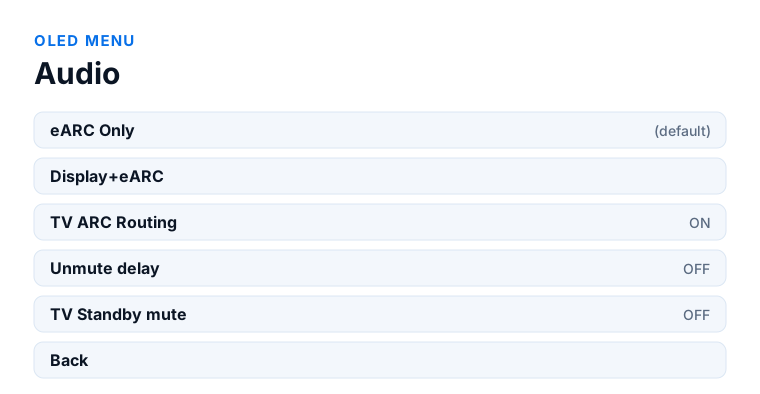
- OLED menu → Audio → eARC Only, the default since firmware 0.71, so no audio goes to the television at all.
- Confirm the sound system supports the format. Atmos over TrueHD does not fit through ARC; a sound system with ARC only cannot receive it.
- Power-cycle the source, then check what the Sonos app reports while Atmos content is playing.
Which model do you have?
HDfury Arcana (18Gbps). Everything on this page applies unchanged. Both models extract the same audio formats up to Dolby Atmos over TrueHD and Dolby MAT Atmos, and both send it out over eARC. For a Sonos Arc or Beam Gen 2 at 4K60, this is the model to have.
HDfury Arcana 2 VRR (40Gbps). Identical audio result. Choose this model only if your video needs it — 4K120, VRR, 8K or a second output. There is no audio advantage over the original Arcana for a Sonos setup.
What is actually going wrong
A Sonos Arc or Beam Gen 2 can play Dolby Atmos in two different wrappers. Over ARC it accepts Atmos carried inside Dolby Digital Plus — which is what streaming apps use. Over eARC it can additionally accept Atmos carried inside Dolby TrueHD, which is what a UHD Blu-ray disc holds.
The catch is what sits in between. When your source is plugged into the TV, the TV decides what comes back out of the ARC/eARC port. Many TVs re-encode everything to Dolby Digital, some downmix to stereo PCM, and a TV without eARC cannot pass TrueHD at all — there is not enough bandwidth on plain ARC. Your player sent Atmos; the TV threw it away.
This is the problem the HDfury Arcana exists to solve. It sits between the source and the TV, splits the signal, and sends the audio straight to the Sonos over its own eARC output. The TV never gets a vote.
Work through it in this order
1. Confirm the source is really sending Atmos
An HDfury Arcana can only pass on what it receives. The usual offenders:
- Apple TV 4K — Settings › Video and Audio › Audio Format must be set to Dolby Atmos, not Stereo. Leave Match Content on for audio.
- PlayStation 5 — Settings › Sound › Audio Output. Set the output device to HDMI and the audio format to Dolby Atmos where the app supports it. Note that the PS5 does not bitstream TrueHD from a UHD Blu-ray disc; for disc-based TrueHD Atmos you need a dedicated player.
- UHD Blu-ray players — the HDMI audio output must be set to bitstream or “auto”, not to PCM. A player set to PCM decodes Atmos internally and sends a plain multichannel stream.
- Streaming apps — Atmos is per title and often per subscription tier. Test with a title you know carries it.
2. Check what the Sonos is actually receiving
Open the Sonos app, go to the room, and look at the Now Playing screen. It names the incoming format. “Dolby Atmos” or “Dolby Atmos - TrueHD” is what you want. “Dolby Digital” or “Stereo PCM” means the format was lost somewhere upstream — and now you know the problem is between the source and the soundbar, not inside the soundbar.
3. Verify the cabling
The order matters and is easy to get subtly wrong:
- Source → HDfury Arcana HDMI IN
- Arcana HDMI OUT → TV or projector (video only, from the TV's point of view)
- Arcana eARC OUT → the HDMI port on the Sonos Arc or Beam Gen 2
The Sonos connects to the Arcana, not to the TV. If it is still plugged into the TV's eARC port, you have simply added a box to the chain and changed nothing.
4. Check the EDID setting
EDID is how the HDfury Arcana tells the source what the system can handle. On the automatic profile it merges what the display and the audio system report, which is right most of the time. If the source still refuses to send Atmos, the merged EDID may be understating the audio capability — some displays report a very conservative audio block. Forcing an EDID profile that advertises the audio system's capabilities is the fix. The Arcana manual covers the profiles in detail.
5. Re-handshake
HDMI negotiates capabilities once, when devices come up. After any change: power everything fully off, then start the soundbar, then the HDfury Arcana, then the display, then the source. Simply switching inputs is not enough.
If it still will not work
At this point the question is which link fails. Disconnect the display and run source → HDfury Arcana → Sonos only. If Atmos appears, the problem is EDID negotiation with the display in the mix. If it still does not, the source is not sending Atmos and the fix is in the source's own menus.
Frequently asked
What should I do if I have an HDfury Arcana (18Gbps)?
Everything on this page applies unchanged. Both models extract the same audio formats up to Dolby Atmos over TrueHD and Dolby MAT Atmos, and both send it out over eARC. For a Sonos Arc or Beam Gen 2 at 4K60, this is the model to have.
What should I do if I have an HDfury Arcana 2 VRR (40Gbps)?
Identical audio result. Choose this model only if your video needs it — 4K120, VRR, 8K or a second output. There is no audio advantage over the original Arcana for a Sonos setup.
Do I need an HDfury Arcana if my TV already has eARC?
Often not. A TV with real eARC can pass TrueHD Atmos through to a soundbar. The Arcana earns its place when the TV has ARC only, when the TV re-encodes or downmixes even over eARC, or when you use a projector that has no audio return path at all.
Does the Sonos Arc support eARC?
Yes. The Sonos Arc and Beam Gen 2 have an HDMI eARC input and accept Dolby Atmos over both Dolby Digital Plus and Dolby TrueHD.
Why does streaming give me Atmos but my Blu-ray does not?
Streaming Atmos rides inside Dolby Digital Plus, which fits within plain ARC. Disc-based Atmos rides inside Dolby TrueHD, which needs eARC bandwidth. If your chain only has ARC, that is exactly the split you would expect.
Will the HDfury Arcana upmix stereo to Atmos?
No. The Arcana extracts and passes through what the source sends. It does not decode, re-encode or upmix. Any upmixing is done by the soundbar or receiver.
Related
- eARC not working or falling back to ARC
- Apple TV 4K setup and Panasonic DP-UB820 setup
- HDfury Arcana product page
Does an HDfury Arcana or HDfury Arcana 2 solve this?
For streaming and disc playback the original Arcana is enough. Only pick Arcana 2 if you also need 4K120 or VRR.
Checked against the official HDfury Arcana and HDfury Arcana 2 manuals and against firmware 0.88 and 0.25, August 2026.