
Dolby Atmos with a projector and a soundbar using an HDfury Arcana
Nearly every guide about eARC assumes you have a television. Projectors almost never have an audio return path at all, which makes most of that advice useless — and makes the problem easier to solve than people expect.
Does this match your symptoms?
- Your projector has no ARC or eARC port, so there is nothing to configure.
- You get picture on the projector but no way to send Atmos to the soundbar.
- Guides keep telling you to check eARC settings your projector does not have.
Connect it in this order
- Source HDMI out → HDfury Arcana HDMI IN. The audio has to be taken before the projector, because a projector has no audio return path.
- HDfury Arcana HDMI OUT → projector. Video only; the projector never touches the audio.
- HDfury Arcana eARC OUT → Sonos Arc, Beam Gen 2 or your receiver.
- Set the source to bitstream or passthrough, not PCM, so the Atmos metadata survives.
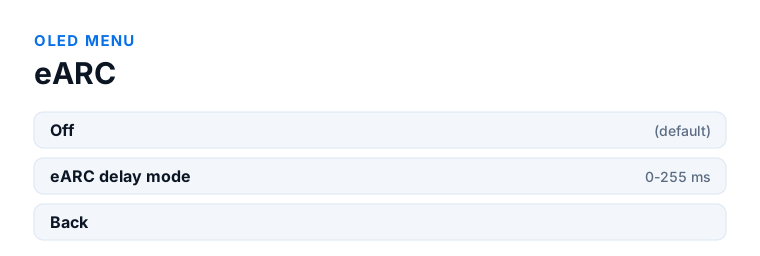
- If sound arrives ahead of the picture, use OLED menu → eARC → eARC delay mode. Projectors often add processing latency of their own.
Which model do you have?
HDfury Arcana (18Gbps). The right model for most projectors, which run at 4K60 or below. Source to HDMI IN, HDMI OUT to the projector, eARC OUT to the sound system. The extra bandwidth of the Arcana 2 would go unused.
HDfury Arcana 2 VRR (40Gbps). Choose this if your projector is 4K120, if a console needs VRR passed through, or if you want a second output alongside the projector — a television in the same room, a capture device, or an older AVR fed over HDMI COPY. Cable length matters more with a ceiling mount, so use active or optical beyond 4 metres.
Why the usual advice does not apply
The standard eARC arrangement sends everything into the television and lets the television return audio to the soundbar. That works because televisions have an ARC or eARC output.
Projectors, with very few exceptions, do not. There is no return path to configure, no CEC audio setting to enable, and no firmware update coming that will add one. Anyone telling you to check your projector's eARC settings is describing a feature it does not have.
So the audio cannot come back from the display. It has to be taken before the display — and that is a different, and simpler, problem.
The arrangement that works
Put the audio extraction between the source and the projector. The source connects to the HDfury Arcana; the Arcana's HDMI output carries video onward to the projector; the Arcana's eARC output carries full audio directly to the Sonos Arc, Beam Gen 2 or receiver.
The projector receives video only and never touches the audio. The sound system receives audio taken straight from the source, which means Dolby Atmos over TrueHD, Dolby MAT Atmos, DTS:X and DTS-HD Master Audio all remain intact, subject to what the sound system itself can decode.
This is the setup the Arcana was designed for, and it is why projector owners are a large part of who uses one.
Which model for a projector
Most projectors run at 4K60 or below, in which case the original HDfury Arcana at 18Gbps is sufficient and the extra bandwidth of the Arcana 2 would not be used.
Choose the Arcana 2 if you are feeding a 4K120 projector, if a game console needs VRR passed through, or if you want a second output — for a television in the same room, a capture device, or an older receiver fed over HDMI COPY.
Cable length matters more with projectors than with televisions, because the run to a ceiling mount is usually long. Keep copper short where you can; for longer runs use an active or optical HDMI cable rated for the bandwidth you actually need.
Lip sync in a projector chain
Extracting audio before the display removes the delay that a television's video processing would otherwise add. With a projector the situation reverses: projectors often have noticeable processing latency of their own, so the audio can arrive ahead of the picture.
Both models have an adjustable eARC delay from 0 to 255 ms for exactly this. Start low, raise it gradually, and judge on dialogue rather than effects. The device can only delay audio that arrives early; it cannot move audio forward that is already late.
What about the projector's own audio output?
Some projectors have an analogue or optical output. Neither carries Dolby Atmos over TrueHD: optical is limited to compressed formats and analogue is stereo. If Atmos is the goal, those outputs are not a route to it, whatever the specification sheet suggests about them being audio outputs.
Frequently asked
What should I do if I have an HDfury Arcana (18Gbps)?
The right model for most projectors, which run at 4K60 or below. Source to HDMI IN, HDMI OUT to the projector, eARC OUT to the sound system. The extra bandwidth of the Arcana 2 would go unused.
What should I do if I have an HDfury Arcana 2 VRR (40Gbps)?
Choose this if your projector is 4K120, if a console needs VRR passed through, or if you want a second output alongside the projector — a television in the same room, a capture device, or an older AVR fed over HDMI COPY. Cable length matters more with a ceiling mount, so use active or optical beyond 4 metres.
Do projectors have eARC?
Almost none do. There are a handful of exceptions, but as a rule a projector has no audio return path at all, which is why audio has to be taken before the projector rather than from it.
Can I get Atmos from Netflix on my projector to a Sonos Arc?
Yes, if the app runs on an external source such as an Apple TV or a streaming box connected through the HDfury Arcana. Apps running on the projector itself, where those exist, cannot return audio.
Which HDfury Arcana do I need for a 4K projector?
For 4K60, the original Arcana. Choose the Arcana 2 for a 4K120 projector, for VRR from a console, or if you want a second output alongside the projector.
The sound is slightly ahead of the picture. Can I fix that?
Yes. Both models offer an adjustable eARC delay from 0 to 255 ms. Projectors often add processing latency, so a small delay on the audio usually lines it up.
Related
- No Dolby Atmos on Sonos Arc or Beam Gen 2
- Audio runs ahead of the picture
- Which HDfury Arcana do you need?
Does an HDfury Arcana or HDfury Arcana 2 solve this?
For a 4K60 projector the original Arcana is sufficient. Choose the Arcana 2 for 4K120, VRR or a second output.
Checked against the official HDfury Arcana and HDfury Arcana 2 manuals and against firmware 0.88 and 0.25, August 2026.