
No sound after an HDfury Arcana firmware update
The update finished, the OLED came back, and the audio did not. In almost every case the firmware did not break anything — it reset something you had set months ago and forgotten about.
Does this match your symptoms?
- The update finished and the audio did not come back.
- The OLED still shows the old firmware version.
- Lip sync you had corrected months ago is suddenly back.
Fix it in this order
- Check the version on the OLED against the release you installed. If it still shows the old number, the file was not read from the FAT32 stick.
- OLED menu → Audio. Restore what you had: eARC Only or Display+eARC, and TV ARC Routing on or off. All five options are back at factory defaults.
- OLED menu → eARC. Set the delay again if you were using one; it is back to off.
- On the HDfury Arcana 2, OLED menu → Scaler. Set the HDMI COPY mode again — it is back to No Scaling.
- Set the source back to bitstream, then power everything off and restart in order: sound system, HDfury Arcana, display, source last.
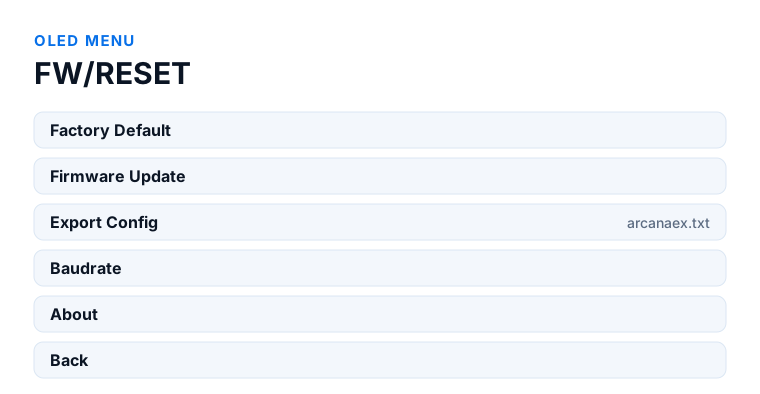
Which model do you have?
HDfury Arcana (18Gbps). The update file is arcanafw.bin, in the root of a FAT32 stick. After the update, the Scaler sub-menu returns to Auto and the Audio sub-menu to eARC Only with TV ARC Routing on. Current firmware is 0.88.
HDfury Arcana 2 VRR (40Gbps). The update file is arcana-2.bin. The Scaler sub-menu returns to No Scaling, not Auto — which means any HDMI COPY mode you were using is gone, including Audio Only TX1 feeding an older AVR. That is the difference most likely to leave you without sound after an update on this model. Current firmware is 0.25.
First: confirm the update actually completed
Check the version on the OLED against the release you installed. If it still shows the old number, the file was not read. The HDfury Arcana expects arcanafw.bin and the Arcana 2 expects arcana-2.bin, in the root of a FAT32-formatted USB stick — not in a folder, and not still inside the ZIP. A stick formatted as exFAT or NTFS is the most common reason an update silently does nothing.
If the version did change, the update is fine and the fault is in the settings underneath it. One more thing worth knowing before you worry: the manual says the unit must be power-cycled after an update, and that the OLED takes about 15 seconds to come back on the Arcana and about 30 seconds on the Arcana 2. A unit that looks dead for half a minute is behaving normally.
What a firmware update resets
A firmware update rewrites the device's configuration area. Anything you tuned by hand goes back to its factory value, and three of those settings are the usual suspects for missing audio.
1. The Audio sub-menu
This is the one to check first, because it sits in the OLED menu and it decides where sound goes. The manual lists five options with their factory defaults: eARC Only (default — sound goes to the eARC system and not to the display), Display+eARC, TV ARC Routing ON (default), Unmute delay OFF (default) and TV Standby mute OFF (default). If you had changed any of these, they are back to the values above.
Two are worth singling out. If you had switched to Display+eARC because your television had trouble returning ARC audio, that is gone. And if you had turned TV ARC Routing off to stop the television interfering, that is gone too.
2. A forced EDID, if you ever set one
EDID on both models is handled by AutoMix by default: the HDfury Arcana builds a custom EDID by mixing what the connected sinks report. Modes such as TV only, eARC only or TV+eARC can be forced, but the manual is specific that advanced EDID management runs over RS232 — there is no EDID entry in the OLED menu. If you have never used RS232, you never had a forced EDID and this is not your cause.
If you did set one, apply it again and then power-cycle the source, because sources cache EDID and will otherwise keep using the old one.
3. eARC delay
The adjustable eARC delay runs from 0 to 255 ms and resets to its default. This will not cause silence, but if you had it set to compensate for audio running ahead of the picture, that compensation is gone and the lip sync you fixed is back.
4. Scaling and output mode
On the HDfury Arcana 2, the HDMI COPY output mode resets as well. If you were using COPY as a full HDMI audio output feeding an older receiver, it is now back to mirroring the main signal and your receiver has no audio path at all. Set it back to the audio-output mode.
Then: force a fresh handshake
HDMI negotiates once, at connect, and does not renegotiate on its own. After a firmware update the HDfury Arcana has effectively introduced itself again, but everything around it is still working from the conversation it had before.
Power everything fully off — not standby, actually off at the plug where you can. Then start in this order: audio system first, then the Arcana, then the display, then the source. Give each device a few seconds to settle before starting the next one. This single step resolves a large share of post-update audio faults.
If there is still nothing
Check the source's own audio setting. Many sources reset to PCM when they detect a changed EDID, and PCM is not the format you want if you are chasing Atmos over TrueHD. Set the source back to bitstream or automatic passthrough.
Then check whether the audio system is on the right input. The HDfury Arcana's eARC output must go to the port on the soundbar or receiver that is marked ARC or eARC — not a regular HDMI input.
If audio returns but the lossless formats do not, the chain has fallen back to ARC rather than eARC. That is a separate fault with its own causes.
Should you roll back?
Generally no. HDfury advises against downgrading a unit that shipped with firmware 0.87 or newer unless support specifically tells you to, because the newer hardware revisions depend on the newer firmware. Work through the settings first; a rollback rarely turns out to be the answer, and on some units it is not reversible.
Frequently asked
What should I do if I have an HDfury Arcana (18Gbps)?
The update file is arcanafw.bin, in the root of a FAT32 stick. After the update, the Scaler sub-menu returns to Auto and the Audio sub-menu to eARC Only with TV ARC Routing on. Current firmware is 0.88.
What should I do if I have an HDfury Arcana 2 VRR (40Gbps)?
The update file is arcana-2.bin. The Scaler sub-menu returns to No Scaling, not Auto — which means any HDMI COPY mode you were using is gone, including Audio Only TX1 feeding an older AVR. That is the difference most likely to leave you without sound after an update on this model. Current firmware is 0.25.
Does a firmware update erase my settings?
It resets the configuration area to factory defaults, so the Audio sub-menu options, the eARC delay, the scaler mode and any forced EDID all go back to how they shipped. Note down any values you rely on before updating.
Why does the OLED still show the old firmware version?
The file was not read. Use a FAT32-formatted USB stick, put only the extracted .bin file in the root of it, and confirm the filename is arcanafw.bin for the HDfury Arcana or arcana-2.bin for the Arcana 2.
Do I have to update at all?
Only if a release fixes something you are affected by or adds support you need. A working chain does not need updating for its own sake. The downloads page lists what each version changed and when it was released.
Can I go back to the previous firmware?
HDfury advises against downgrading units supplied with firmware 0.87 or newer unless their support team specifically instructs it. Try the settings and the handshake order first.
Related
- eARC not working or falling back to ARC
- No Dolby Atmos on Sonos Arc or Beam Gen 2
- All firmware versions and release dates
Does an HDfury Arcana or HDfury Arcana 2 solve this?
Current firmware is 0.88 for the Arcana and 0.25 for the Arcana 2, both released 27 January 2026.
Checked against the official HDfury Arcana and HDfury Arcana 2 manuals and against firmware 0.88 and 0.25, August 2026.