
No sound from an HDfury Arcana when the TV wakes from standby
Everything worked last night. This morning the television comes on and the soundbar stays silent until you unplug the Arcana. This is the single most reported problem in owner discussions, and there are several ways to fix it that are less drastic than pulling the power.
Does this match your symptoms?
- Sound is gone every time the television comes out of standby.
- Unplugging the HDfury Arcana and plugging it back in restores it, every time.
- The television and the sound system work perfectly when connected directly.
Fix it in this order
- Open the Sonos app → System → your Arc → TV Setup. Owners consistently report the HDfury Arcana reconnecting as soon as this completes, without touching a cable.
- Select the HDMI input where the HDfury Arcana sits and actually start playback. Selecting the input alone is often not enough; playback is what triggers ARC retrieval.
- Turn the television's CEC off and back on, then give it a moment to re-detect connected equipment.
- Power-cycle the HDfury Arcana by disconnecting the USB power cord. Allow 15 seconds for the OLED to return, or 30 on the HDfury Arcana 2.
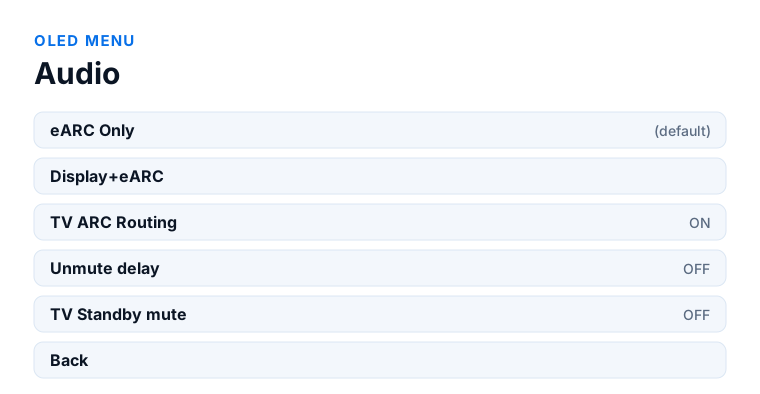
- If it keeps recurring, turn TV ARC Routing off in OLED menu → Audio, or run a Factory Default from FW/RESET.
Which model do you have?
HDfury Arcana (18Gbps). All four fixes apply unchanged. When you power-cycle the unit, allow about 15 seconds for the OLED to return before deciding it has not worked.
HDfury Arcana 2 VRR (40Gbps). Same four fixes, but allow about 30 seconds after a power cycle. Also worth checking on this model: your television must be on TX0 for ARC retrieval to work, since HDMI COPY is not ARC or eARC capable.
What is actually happening
HDMI negotiates once, at connect, and does not renegotiate on its own. When a television goes into standby and comes back, it re-announces itself to the chain — but the audio return path does not always come back with it.
The revealing detail, reported again and again by owners, is that the television and the sound system work perfectly when connected directly to each other. It is only when the audio is relayed back through the HDfury Arcana that the wake-up handshake fails. That points at timing rather than at any one device being faulty: the parts of the chain come back in an order nobody designed for.
It is worth knowing that this often starts after a firmware update — on the television, on the soundbar, or on the Arcana. Owners have traced episodes of it to Sonos updates in particular, and HDfury have released firmware in response. If yours began suddenly on a setup that had been stable for months, something updated.
Four fixes, quickest first
1. Re-run TV Setup in the Sonos app. Open the Sonos app, go to System, select your Arc, and choose TV Setup. Owners consistently report that the HDfury Arcana connects to the Sonos Arc as soon as this completes. It takes under a minute and does not involve touching any cables.
2. Switch to an HDMI input and start playback. Select the HDMI input where the Arcana sits and actually play something. That triggers ARC retrieval by the Arcana and wakes the sound system with it. Simply selecting the input without starting playback is often not enough.
3. Turn CEC off and back on in the television. Under the television's general or external device settings, find HDMI-CEC — or whatever your manufacturer calls it — and cycle it. Give it a moment afterwards; some televisions take a while to re-detect connected equipment.
4. Power-cycle the Arcana. The blunt instrument, and the one most owners end up using. Disconnect the USB power cord, wait a few seconds, reconnect. Remember the OLED takes about 15 seconds to come back on the Arcana and about 30 on the Arcana 2, so a unit that looks dead for half a minute is behaving normally.
Settings that make it less likely
TV Standby mute is off by default, which means the HDfury Arcana keeps feeding the sound system when the television is off. That is deliberate, and it also means the eARC link never fully drops. Turning it on stops the sound with the screen, which some owners prefer — but it introduces one more thing that has to come back correctly on wake.
TV ARC Routing is on by default. If your fault is specifically about the television's own audio returning after standby, and external sources are always fine, turning this off removes the ARC retrieval path from the equation entirely. You lose the television's apps through the sound system, but you get a chain that wakes reliably.
Firmware. Check the version on the OLED against the current release. Several wake-up and handshake issues have been addressed in firmware, and running a version from before the problem appeared is worth ruling out.
Establish which link is failing
Before changing settings, find out where it breaks. Look at the HDfury Arcana's OLED when the fault occurs. If it reports a valid incoming signal, the input side woke up correctly and the problem is between the Arcana and the sound system. If it reports nothing, the source or the television has not come back properly and the Arcana is downstream of the real fault.
Then test the two paths separately. Play something from an external source over HDMI, and separately play something from the television's own apps. If external sources always work after standby and only the television's audio fails, that is an ARC retrieval problem and the TV ARC Routing setting is the relevant control. If both fail, it is the eARC link to the sound system.
If none of it holds
A factory default from the FW/RESET sub-menu clears every setting back to how the unit shipped, and owners report it restoring the handshake when nothing else would. Note down anything you rely on first, because the Audio sub-menu options, the eARC delay and the scaler mode all go with it.
If the problem survives that, export the configuration from the same sub-menu — it writes arcanaex.txt to a USB stick with your active signal information, EDID tables and settings — and take it to HDfury's Discord support server. Wake-up behaviour depends heavily on the specific television and soundbar firmware combination, and that is where those combinations get discussed.
Frequently asked
What should I do if I have an HDfury Arcana (18Gbps)?
All four fixes apply unchanged. When you power-cycle the unit, allow about 15 seconds for the OLED to return before deciding it has not worked.
What should I do if I have an HDfury Arcana 2 VRR (40Gbps)?
Same four fixes, but allow about 30 seconds after a power cycle. Also worth checking on this model: your television must be on TX0 for ARC retrieval to work, since HDMI COPY is not ARC or eARC capable.
Why does sound only fail after standby?
HDMI negotiates once, at connect. When a television wakes it re-announces itself, but the audio return path does not always come back with it. The chain comes up in an order nobody designed for.
What is the quickest fix?
Open the Sonos app, go to System, select the Arc and run TV Setup. Owners consistently report the HDfury Arcana reconnecting as soon as that completes, without touching any cables.
Why did this start suddenly?
Almost always a firmware update, on the television, the soundbar or the HDfury Arcana. Sonos updates have been traced to episodes of this, and HDfury have released firmware in response.
Does it help to turn TV ARC Routing off?
If only the television's own audio fails after standby and external sources are fine, yes. It removes the ARC retrieval path from the equation, at the cost of the TV's apps through the sound system.
Related
- eARC not working or falling back to ARC
- Switching between TV apps and the HDMI input
- TV remote volume on a Sonos Arc
Does an HDfury Arcana or HDfury Arcana 2 solve this?
Reported on both models. Check your firmware version first — several handshake issues have been addressed in updates.
Checked against the official HDfury Arcana and HDfury Arcana 2 manuals and against firmware 0.88 and 0.25, August 2026.