
Sync lost when the frame rate changes on an HDfury Arcana 2
Content switches from 24 Hz to 60 Hz, or an app hands over to another, and the picture drops. Sometimes it recovers; sometimes the chain has to be restarted. Owners of the Arcana 2 report this most often with an Apple TV and match frame rate enabled.
Does this match your symptoms?
- The picture drops when content switches between 24 and 60 Hz.
- After a restart the chain reports 1080p SDR and refuses to offer 4K.
- Only a full power-down, receiver included, brings it back.
Fix it in this order
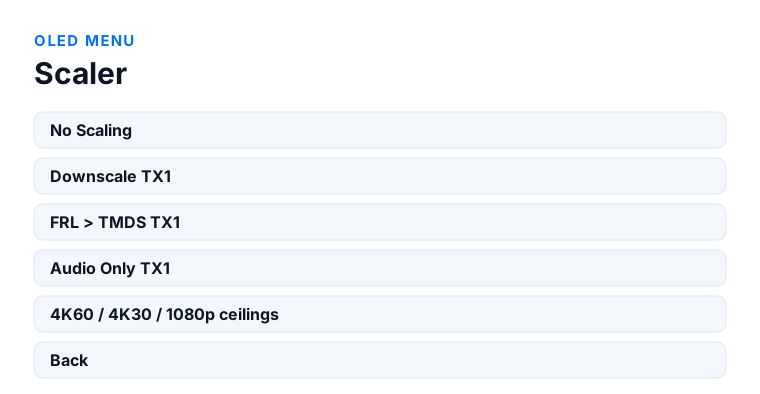
- OLED menu → Scaler. Pick the mode that matches your display's maximum capability instead of leaving the chain to negotiate freely.
- OLED menu → LLDV>HDR → ON, and HDR → Auto. For an LLDV setup these two are all you need.
- Change nothing else. Every additional forced value is one more thing to renegotiate at each frame rate change.
- Test with match frame rate off on the source. If the problem disappears, you have confirmed the cause — treat it as a diagnostic before deciding whether to live with it.
- If the chain comes up as 1080p SDR, power everything down including the receiver, then restart in order. A partial restart will not clear it.
Which model do you have?
HDfury Arcana (18Gbps). This page is mostly about FRL chains, which this model does not carry: it is HDMI 2.0b at 18 Gbps with TMDS only. Frame rate switching still causes a renegotiation, and the same advice applies — set OLED menu → Scaler to a mode matching your display instead of leaving it on Auto, and restart the chain in order if it comes up wrong.
HDfury Arcana 2 VRR (40Gbps). This is the model the reports concern. Set OLED menu → Scaler to the mode matching your display's maximum, set LLDV>HDR to ON with HDR on Auto, and change nothing else. If the chain comes up identifying the display as 1080p SDR, power everything down including the receiver — a partial restart will not clear it.
What owners describe
Two related symptoms turn up in the same discussions. The first is losing sync at the moment the frame rate changes, needing a reset of the HDfury Arcana 2 or of the source to re-establish the handshake. The second is subtler: after a restart, the chain comes up having identified the display incorrectly — reporting 1080p SDR where it should see 4K with LLDV, and then refusing to offer 4K at all until everything is restarted, receiver included.
Both are handshake and EDID problems rather than bandwidth problems. The signal is not too big for the chain; the devices have agreed on the wrong description of each other and are behaving accordingly.
Owners have reported this persisting across firmware releases, so it is worth setting expectations: this is a known area of friction between HDMI 2.1 sources, FRL signalling and the devices in between, not something a single setting reliably eliminates.
The two settings that matter
For an LLDV setup, owners consistently report that only two settings are needed, and that adding more is where trouble starts.
First, set a scaler mode that matches your display's maximum capability. The manual makes the same point from a different angle: a scaler mode matching the display's maximum can resolve startup issues, including not getting Atmos at startup. Leaving the chain to negotiate freely at every switch is what gives it the opportunity to negotiate wrongly.
Second, set LLDV>HDR to ON, with HDR on Auto. That is the documented pair, and it is enough.
Once those are set, resist the temptation to adjust anything else. Every additional forced value is another thing that has to be renegotiated correctly when the frame rate changes.
Reduce how often the chain has to renegotiate
Every frame rate change is a fresh negotiation, so the fewer of them there are, the fewer opportunities for one to fail.
On an Apple TV, match frame rate is what triggers the switching. Turning it off means everything is output at one rate, which removes the switching entirely at the cost of judder on 24 Hz material. That is a real trade-off rather than a fix, but it is a useful diagnostic: if the problem disappears with match frame rate off, you have confirmed the cause.
Match dynamic range has the same effect for HDR switching. If your dropouts happen when moving between SDR and HDR content rather than between frame rates, that is the setting to test.
There is a related note in the manual: most Dolby Vision content is 4K24, so with match frame rate on, a display that cannot handle the maximum rate can still show the content comfortably.
When the chain comes up wrong
If the HDfury Arcana 2 restarts and identifies the display incorrectly, a partial restart will not clear it. Owners report needing to power everything down, including the receiver, rather than just the Arcana.
Bring it back up in order: sound system, Arcana, display, source last, with a few seconds between each. The order matters because each device reads the description of the one downstream at the moment it starts.
If it recurs regularly rather than occasionally, a Factory Default from the FW/RESET sub-menu clears any accumulated state, after which you set the scaler mode and LLDV>HDR again — and only those.
Firmware, in both directions
Check the version on the OLED against the current release, because handshake behaviour has changed across firmware versions in both directions: some releases have improved it, and owners have reported regressions on specific versions too.
HDfury devices allow any firmware to be installed at any time, so an older release can be reinstalled if a newer one behaves worse in your particular chain. One caveat from the manual applies: HDfury advise against downgrading a unit supplied with firmware 0.87 or newer unless their support specifically instructs it, so ask on their Discord before rolling back rather than after.
Frequently asked
What should I do if I have an HDfury Arcana (18Gbps)?
This page is mostly about FRL chains, which this model does not carry: it is HDMI 2.0b at 18 Gbps with TMDS only. Frame rate switching still causes a renegotiation, and the same advice applies — set OLED menu → Scaler to a mode matching your display instead of leaving it on Auto, and restart the chain in order if it comes up wrong.
What should I do if I have an HDfury Arcana 2 VRR (40Gbps)?
This is the model the reports concern. Set OLED menu → Scaler to the mode matching your display's maximum, set LLDV>HDR to ON with HDR on Auto, and change nothing else. If the chain comes up identifying the display as 1080p SDR, power everything down including the receiver — a partial restart will not clear it.
Which settings should I use for an LLDV setup?
Two, and only two: a scaler mode matching your display's maximum capability, and LLDV>HDR set to ON with HDR on Auto. Additional forced values give the chain more to renegotiate.
Why does turning off match frame rate help?
It removes the frame rate switching entirely, so the chain never has to renegotiate. It costs judder on 24 Hz material, so treat it as a diagnostic first and a fix second.
The chain came up as 1080p SDR instead of 4K. What now?
A partial restart will not clear it. Power everything down including the receiver, then start in order: sound system, HDfury Arcana, display, source last.
Can I go back to older firmware?
HDfury devices accept any firmware at any time, but the manual advises against downgrading units supplied with 0.87 or newer unless support instructs it. Ask on their Discord first.
Related
- Dolby Vision or LLDV not working
- Black screen at 4K120 or VRR
- EDID: what it does and when to touch it
Does an HDfury Arcana or HDfury Arcana 2 solve this?
Reported mainly on the Arcana 2 with HDMI 2.1 sources. Set the scaler mode and LLDV>HDR, and leave the rest alone.
Checked against the official HDfury Arcana and HDfury Arcana 2 manuals and against firmware 0.88 and 0.25, August 2026.