
HDfury Arcana OLED shows no signal, or the unit seems dead
This is a different fault from a black screen at 4K120. Here nothing arrives at all — the Arcana reports no signal, or its display stays dark entirely. The causes are mostly mundane, and one of them is simply not waiting long enough.
Does this match your symptoms?
- The OLED display reports no signal while everything is connected.
- The OLED stays completely dark and the unit appears dead.
- It happened right after a firmware update.
Fix it in this order
- Check the USB power. A USB port on a television that switches off with the television takes the HDfury Arcana down with it.
- If you just updated firmware, wait. After a power cycle the OLED takes about 15 seconds on the HDfury Arcana and about 30 on the HDfury Arcana 2.
- Confirm the source is awake and outputting, and that it is connected to HDMI IN rather than an output.
- Swap the input cable for one you know is good, between 2 and 4 metres of copper.
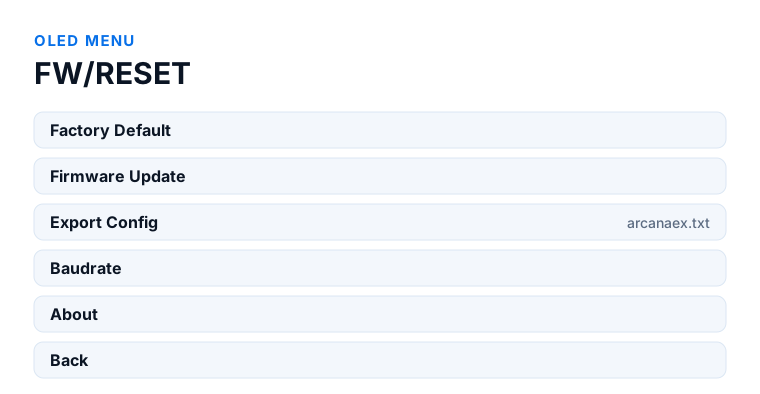
- Power everything off and restart in order; if it persists, use OLED menu → FW/RESET → Factory Default, and Export Config for support.
Which model do you have?
HDfury Arcana (18Gbps). After a firmware update and power cycle, allow about 15 seconds for the OLED to come back. One HDMI output to check, so if the OLED reports a valid input the fault is between the Arcana and your display or sound system.
HDfury Arcana 2 VRR (40Gbps). Allow about 30 seconds for the OLED to return — twice as long, and long enough that owners assume the unit has failed. There are two HDMI outputs to check: confirm your display is on TX0 and not on HDMI COPY, because HDMI COPY may be running in a mode your display cannot accept.
If the OLED itself is dark
The HDfury Arcana is powered over USB. Check that the supplied USB power cable is properly seated at both ends and that the source of power actually delivers — a USB port on a television that switches off with the television will take the Arcana down with it, which produces a fault that appears and disappears with the TV.
If you have just run a firmware update, wait. The manual is explicit: after an update the unit must be power-cycled by disconnecting and reconnecting the USB power cord, and then the OLED takes roughly 15 seconds to come back on the Arcana and roughly 30 seconds on the Arcana 2. A unit that looks dead for half a minute after an update is behaving exactly as documented.
If the display stays dark well beyond that, try a different USB power source before concluding anything about the device.
If the OLED is on but reports no signal
Then the HDfury Arcana is fine and nothing is arriving at its input. Work outwards from there.
Check that the source is actually outputting. A source in standby, or one that has gone to sleep and not woken, sends nothing. Some sources also stop output when they detect no valid sink.
Swap the input cable for one you know is good. A cable fault at the input produces exactly this symptom, and cable is the single most common cause across all Arcana support cases.
Confirm which port the source is on. HDMI IN is the input; the outputs will not accept a source.
Force a fresh handshake
HDMI negotiates once, at connect, and does not renegotiate on its own. A chain that came up in the wrong order can sit in a failed state indefinitely.
Power everything fully off, at the plug where you can. Then start the audio system, the HDfury Arcana, the display, and the source last, allowing a few seconds between each. This resolves a large share of no-signal reports on its own, and it costs nothing to try before anything else.
Read the info pages
Both models show signal information on the OLED and can put it on screen through the OSD. That tells you what the HDfury Arcana thinks it is receiving: resolution, frame rate, colour format, HDR or VRR status and the audio format.
This is the fastest way to split the chain in half. If the OLED reports a correct incoming signal, the input side is fine and your problem is on the output side. If it reports nothing, the problem is upstream and nothing you change downstream will help.
The diagnostic order HDfury recommend
This is worth stating because it is the opposite of what most people do. The manual is explicit that the first step is not volume control, CEC or ARC. The first step is establishing that source to HDfury Arcana to display plays content correctly, so you know the HDMI link itself is solid.
Only once that holds does it make sense to work on anything else. Marginal cables produce symptoms that look like CEC faults, EDID problems and device failures in turn, and every hour spent on settings before the link is proven is an hour that may have been wasted.
Factory default, and the file to send support
The FW/RESET sub-menu holds Factory Default, which returns every setting to how the unit shipped. That is worth doing if you have changed a lot and lost track — but note that it also clears the Audio sub-menu options, the eARC delay and the scaler mode, so write down anything you rely on first.
The same sub-menu holds Export Config. This writes a support file to a USB stick, named arcanaex.txt by default, containing the active signal information, the EDID tables and every option set on your unit. If you end up contacting HDfury support, sending that file saves a long exchange of questions.
The sub-menu also contains Baudrate for RS232 and an About entry, neither of which affects a no-signal fault.
Frequently asked
What should I do if I have an HDfury Arcana (18Gbps)?
After a firmware update and power cycle, allow about 15 seconds for the OLED to come back. One HDMI output to check, so if the OLED reports a valid input the fault is between the Arcana and your display or sound system.
What should I do if I have an HDfury Arcana 2 VRR (40Gbps)?
Allow about 30 seconds for the OLED to return — twice as long, and long enough that owners assume the unit has failed. There are two HDMI outputs to check: confirm your display is on TX0 and not on HDMI COPY, because HDMI COPY may be running in a mode your display cannot accept.
How long does the OLED take to come back after a firmware update?
About 15 seconds on the HDfury Arcana and about 30 seconds on the Arcana 2, after you disconnect and reconnect the USB power cord. Waiting is part of the documented procedure.
The OLED is on but says no signal. Where do I start?
At the input. Confirm the source is awake and outputting, swap the input cable for one you know is good, and check the source is on HDMI IN rather than an output.
What is Export Config for?
It writes a support file to a USB stick, arcanaex.txt by default, with the active signal information, the EDID tables and all your settings. Send it with any support request.
Will a factory reset lose my settings?
Yes, all of them: the Audio sub-menu options, the eARC delay, the scaler mode and any forced EDID. Note down what you rely on before resetting.
Related
Does an HDfury Arcana or HDfury Arcana 2 solve this?
Both models show the same information on the OLED and both carry the same Factory Default and Export Config options.
Checked against the official HDfury Arcana and HDfury Arcana 2 manuals and against firmware 0.88 and 0.25, August 2026.